.NET Framework官方部落格:https://msdn.microsoft.com/en-us/library/ms171868%28v=vs.110%29#v461
Downloading and Installing the .NET Framework 4.6.1,發佈日期:2015/11/17
Downloading and Installing the .NET Framework 4.5.2,發佈日期:2014/5/6
.NET Framework 4.6.x的需求應該短期不會有,但還是準備一下
而.NET Framework 4.6才剛剛於2015/10/15發布,就旋即發布4.6.1,真的是!@#$
另外連微軟自家的Exchange Server 2016 RTM也僅支援.NET Framework 4.5.2,而不支援.NET Framework 4.6,這也是另一個窘事
連同Skype for Business Server 2015/Lync Server 2013,微軟也希望暫時不要安裝.NET Framework 4.6.1
官方說明:.NET Framework 4.6.1 and Skype for Business Server 2015/Lync Server 2013
================================================
.NET Framework 4.6.1 (Offline Installer) for Windows 7 SP1, 8, 8.1, 10, Windows Server 2008 R2 SP1, 2012 and 2012 R2 (x86 and x64) - (Multiple Languages)
發行日期: 2015/12/1
檔案大小: 65 MB
This is an offline installer. There are separate installers for web and offline installation. If you intend to redistribute either of these installers in the setup for your own product or application, we recommend that you choose the web installer because it is smaller and typically downloads faster. You can download the web installer here. Wherever possible, Microsoft recommends you use the Web Installer in lieu of the Offline Package for optimal efficiency and bandwidth requirements. The offline package can be used in situations where the web installer cannot be used due to lack of internet connectivity. This package is larger than the web installer and does not include the language packs. You can download and install the language packs from here.
檔案名稱:
mu_.net_fx_4_6_1_for_win_7sp1_8_8dot1_10_win_server_2008r2sp1_2012_2012r2_x86_x64_7277558.exe
語言: English, Japanese, Korean, Arabic, Czech, Danish, German, Greek, Spanish, Finnish, French, Hebrew, Hungarian, Italian, Dutch, Polish, Portuguese-Brazil, Russian, Swedish, Turkish, Chinese - Traditional, Chinese - Simplified, Portuguese-Portugal, Norwegian-Bokmal
SHA1:83D048D171FF44A3CAD9B422137656F585295866
.NET Framework 4.6.1 (Web Installer) for Windows 7 SP1, 8, 8.1, 10, Windows Server 2008 R2 SP1, 2012 and 2012 R2 (x86 and x64) - Web Installer (Multiple Languages)
發行日期: 2015/12/1
檔案大小: 1 MB
This is a web installer. There are separate installers for web and offline installation. If you intend to redistribute either of these installers in the setup for your own product or application, we recommend that you choose the web installer because it is smaller and typically downloads faster. The web installer is a small package (less than 1 MB) that automatically determines and downloads only the components applicable for a particular platform. The web installer also installs the language pack matching the language of the user’s operating system. The offline package can be used in situations where the web installer cannot be used due to lack of internet connectivity. This package is larger than the web installer and does not include the language packs. You can download the offline installer from here. You can download and install the language packs from here.
檔案名稱:
mu_.net_fx_4_6_1_for_win_7sp1_8_8dot1_10_win_server_2008_r2sp1_2012_2012r2_x86_x64_web_installer_7277629.exe
語言: English, Japanese, Korean, Arabic, Czech, Danish, German, Greek, Spanish, Finnish, French, Hebrew, Hungarian, Italian, Dutch, Polish, Portuguese-Brazil, Russian, Swedish, Turkish, Chinese - Traditional, Chinese - Simplified, Portuguese-Portugal, Norwegian-Bokmal
SHA1:EE88B05232F43B517D4A368F7EE5065CDE7F67FA
================================================
2016-01-21


2015-09-11
Microsoft .NET Framework 4.6 可以供下載~
微軟下載網頁針對Microsoft .NET Framework 4.6的說明:
Microsoft .NET Framework 4.6 是 Microsoft .NET Framework 4、Microsoft .NET Framework 4.5、Microsoft .NET Framework 4.5.1 及 Microsoft .NET Framework 4.5.2 的就地更新而且均高度相容。離線套件可用在因為沒有網際網路連接而無法使用 Web 安裝程式的情況。
因此,既然可以相容於.NET Framework 4/4.5/4.5.1/4.5.2,當然就要安裝4.6囉~
.NET Framework 4.6 for Windows Vista SP2, 7 SP1, 8, 8.1, Windows Server 2008 SP2, 2008 R2 SP1, 2012 and 2012 R2 (x86 and x64) - Offline Installer (Multiple Languages)
發行日期: 2015/7/20
檔案大小: 62 MB
Microsoft Download:http://www.microsoft.com/zh-TW/download/details.aspx?id=48137
This is an offline installer. There are separate installers for web and offline installation. If you intend to redistribute either of these installers in the setup for your own product or application, we recommend that you choose the web installer because it is smaller and typically downloads faster. You can download the web installer here. Wherever possible, Microsoft recommends you use the Web Installer in lieu of the Offline Package for optimal efficiency and bandwidth requirements. The offline package can be used in situations where the web installer cannot be used due to lack of internet connectivity. This package is larger than the web installer and does not include the language packs. You can download and install the language packs from here.
檔案名稱:
mu_.net_fx_4.6_for_win_vista_sp2_7sp1_8_8dot1_win_server_2008sp2_2008r2sp1_2012_2012r2_x86_x64_oi_6837939.exe
Microsoft 下載中心檔案名稱:NDP46-KB3045557-x86-x64-AllOS-ENU.exe
語言: English, Japanese, Korean, Arabic, Czech, Danish, German, Greek, Spanish, Finnish, French, Hebrew, Hungarian, Italian, Dutch, Polish, Portuguese-Brazil, Russian, Swedish, Turkish, Chinese - Traditional, Chinese - Simplified, Portuguese-Portugal, Norwegian-Bokmal
SHA1:3049A85843EAF65E89E2336D5FE6E85E416797BE
.NET Framework 4.6 for Windows Vista SP2, 7 SP1, 8, 8.1, Windows Server 2008 SP2, 2008 R2 SP1, 2012 and 2012 R2 (x86 and x64) - Web Installer (Multiple Languages)
發行日期: 2015/7/20
檔案大小: 1 MB
Microsoft Download:https://www.microsoft.com/zh-TW/download/details.aspx?id=48130
This is a web installer. There are separate installers for web and offline installation. If you intend to redistribute either of these installers in the setup for your own product or application, we recommend that you choose the web installer because it is smaller and typically downloads faster. The web installer is a small package (less than 1 MB) that automatically determines and downloads only the components applicable for a particular platform. The web installer also installs the language pack matching the language of the user’s operating system. The offline package can be used in situations where the web installer cannot be used due to lack of internet connectivity. This package is larger than the web installer and does not include the language packs. You can download the offline installer from here. You can download and install the language packs from here.
檔案名稱:
mu_.net_fx_4.6_for_win_vista_sp2_7sp1_8_8dot1_win_server_2008sp2_2008r2sp1_2012_2012r2_x86_x64_wi_6837960.exe
Microsoft 下載中心檔案名稱:NDP46-KB3045560-Web.exe
語言: English, Japanese, Korean, Arabic, Czech, Danish, German, Greek, Spanish, Finnish, French, Hebrew, Hungarian, Italian, Dutch, Polish, Portuguese-Brazil, Russian, Swedish, Turkish, Chinese - Traditional, Chinese - Simplified, Portuguese-Portugal, Norwegian-Bokmal
SHA1:480CA134B9E3F2437DF10719D5A8C77DDEC0A4F1
Microsoft .NET Framework 4.6 是 Microsoft .NET Framework 4、Microsoft .NET Framework 4.5、Microsoft .NET Framework 4.5.1 及 Microsoft .NET Framework 4.5.2 的就地更新而且均高度相容。離線套件可用在因為沒有網際網路連接而無法使用 Web 安裝程式的情況。
因此,既然可以相容於.NET Framework 4/4.5/4.5.1/4.5.2,當然就要安裝4.6囉~
.NET Framework 4.6 for Windows Vista SP2, 7 SP1, 8, 8.1, Windows Server 2008 SP2, 2008 R2 SP1, 2012 and 2012 R2 (x86 and x64) - Offline Installer (Multiple Languages)
發行日期: 2015/7/20
檔案大小: 62 MB
Microsoft Download:http://www.microsoft.com/zh-TW/download/details.aspx?id=48137
This is an offline installer. There are separate installers for web and offline installation. If you intend to redistribute either of these installers in the setup for your own product or application, we recommend that you choose the web installer because it is smaller and typically downloads faster. You can download the web installer here. Wherever possible, Microsoft recommends you use the Web Installer in lieu of the Offline Package for optimal efficiency and bandwidth requirements. The offline package can be used in situations where the web installer cannot be used due to lack of internet connectivity. This package is larger than the web installer and does not include the language packs. You can download and install the language packs from here.
檔案名稱:
mu_.net_fx_4.6_for_win_vista_sp2_7sp1_8_8dot1_win_server_2008sp2_2008r2sp1_2012_2012r2_x86_x64_oi_6837939.exe
Microsoft 下載中心檔案名稱:NDP46-KB3045557-x86-x64-AllOS-ENU.exe
語言: English, Japanese, Korean, Arabic, Czech, Danish, German, Greek, Spanish, Finnish, French, Hebrew, Hungarian, Italian, Dutch, Polish, Portuguese-Brazil, Russian, Swedish, Turkish, Chinese - Traditional, Chinese - Simplified, Portuguese-Portugal, Norwegian-Bokmal
SHA1:3049A85843EAF65E89E2336D5FE6E85E416797BE
.NET Framework 4.6 for Windows Vista SP2, 7 SP1, 8, 8.1, Windows Server 2008 SP2, 2008 R2 SP1, 2012 and 2012 R2 (x86 and x64) - Web Installer (Multiple Languages)
發行日期: 2015/7/20
檔案大小: 1 MB
Microsoft Download:https://www.microsoft.com/zh-TW/download/details.aspx?id=48130
This is a web installer. There are separate installers for web and offline installation. If you intend to redistribute either of these installers in the setup for your own product or application, we recommend that you choose the web installer because it is smaller and typically downloads faster. The web installer is a small package (less than 1 MB) that automatically determines and downloads only the components applicable for a particular platform. The web installer also installs the language pack matching the language of the user’s operating system. The offline package can be used in situations where the web installer cannot be used due to lack of internet connectivity. This package is larger than the web installer and does not include the language packs. You can download the offline installer from here. You can download and install the language packs from here.
檔案名稱:
mu_.net_fx_4.6_for_win_vista_sp2_7sp1_8_8dot1_win_server_2008sp2_2008r2sp1_2012_2012r2_x86_x64_wi_6837960.exe
Microsoft 下載中心檔案名稱:NDP46-KB3045560-Web.exe
語言: English, Japanese, Korean, Arabic, Czech, Danish, German, Greek, Spanish, Finnish, French, Hebrew, Hungarian, Italian, Dutch, Polish, Portuguese-Brazil, Russian, Swedish, Turkish, Chinese - Traditional, Chinese - Simplified, Portuguese-Portugal, Norwegian-Bokmal
SHA1:480CA134B9E3F2437DF10719D5A8C77DDEC0A4F1
2014-07-25
Microsoft .NET Framework 4.5.2最新版下載
Microsoft .NET Framework 已經是Windows不可或缺的系統元件,很多程式是基於之上解譯執行
但其分成不同版本,又上下不相容還是有點麻煩。1.1跟2.0以上不相容,3.5包含2.0,但4.0又獨立於之前的版本。
然後,微軟又在Windows Server 2012上又耍賤招,故意不將3.5安裝在硬碟的source區,必須點選替代路徑去安裝,擺明就是叫所有開發者轉向使用4.0以上的版本。
但其分成不同版本,又上下不相容還是有點麻煩。1.1跟2.0以上不相容,3.5包含2.0,但4.0又獨立於之前的版本。
然後,微軟又在Windows Server 2012上又耍賤招,故意不將3.5安裝在硬碟的source區,必須點選替代路徑去安裝,擺明就是叫所有開發者轉向使用4.0以上的版本。
Microsoft .NET Framework 4.5.2 Release Date: 5/5/2014
Microsoft .NET Framework 4.5.2 (Offline Installer) for Windows Vista SP2, Windows 7 SP1, Windows 8, Windows 8.1, Windows Server 2008 SP2, Windows Server 2008 R2 SP1, Windows Server 2012 and Windows Server 2012 R2
Microsoft .NET Framework 4.5.2 Language Pack (Offline Installer) for Windows Vista SP2, Windows 7 SP1, Windows 8, Windows 8.1, Windows Server 2008 SP2, Windows Server 2008 R2 SP1, Windows Server 2012 and Windows Server 2012 R2
Microsoft .NET Framework 4.5.2 (Web Installer) for Windows Vista SP2, Windows 7 SP1, Windows 8, Windows 8.1, Windows Server 2008 SP2 Windows Server 2008 R2 SP1, Windows Server 2012 and Windows Server 2012 R2
Microsoft .NET Framework 4.5.2 Developer Pack for Windows Vista SP2, Windows 7 SP1, Windows 8, Windows 8.1, Windows Server 2008 SP2 Windows Server 2008 R2 SP1, Windows Server 2012 and Windows Server 2012 R2
2013-04-03
Windows 2012新增.Net Framework 3.5功能的問題
Windows 2012新增.Net Framework 3.5,雖然可以從新增角色及功能精靈點選安裝
 若沒注意一直點下一步,才發現會安裝錯誤

問題出在Windows 2012預設沒有將.Net Framework 3.5放在硬碟的Source中
相信看到這一點就知道微軟預備想要把.Net Framework 3.5踢到旁邊去了
請點點選下列圖示中,指定安裝Sources來源
 確認Windows 2012安裝光碟的位置,指向Sources\SxS路徑即可完成安裝
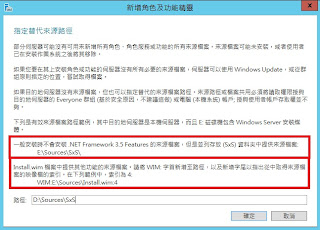


問題出在Windows 2012預設沒有將.Net Framework 3.5放在硬碟的Source中
相信看到這一點就知道微軟預備想要把.Net Framework 3.5踢到旁邊去了
請點點選下列圖示中,指定安裝Sources來源


2010-06-20
Microsoft .NET Framework 4來囉~
 Microsoft .NET Framework 4 可轉散發套件會安裝 .NET Framework 執行階段及所需的相關檔案,以執行並開發以 .NET Framework 4 為目標的應用程式。
Microsoft .NET Framework已經列為安裝Windows之後必備安裝的套件之一了,雖然現在大多仍僅以針對2.0作開發,但也不少程式已經轉往3.0/3.5作開發,如今4.0套件正式發表,相信再過個一段時間之後,便會有程式是針對Microsoft .NET Framework 4.0作開發。
Microsoft .NET Framework 4 (獨立安裝程式)
檔案名稱: dotNetFx40_Full_x86_x64.exe
版本: 4
發佈日期: 2010/4/12
語言: 中文(繁體)
下載項目大小: 48.1 MB
Microsoft .NET Framework 4 Client Profile (獨立安裝程式)
檔案名稱: dotNetFx40_Client_x86_x64.exe
版本: 4
發佈日期: 2010/4/12
語言: 中文(繁體)
下載項目大小: 41.0 MB
Microsoft .NET Framework 4 Full 語言套件 (x86/x64)
檔案名稱: dotNetFx40LP_Full_x86_x64zh-Hant.exe
版本: 4
發佈日期: 2010/6/1
語言: 中文(繁體)
下載項目大小: 3.0 MB
Microsoft .NET Framework 4 Client 語言套件 (Client) (x86)
檔案名稱: dotNetFx40LP_Client_x86zh-Hant.exe
版本: 4
發佈日期: 2010/6/1
語言: 中文(繁體)
下載項目大小: 2.0 MB
2009-01-10
Microsoft .NET Framework 3.5 Service pack 1
Microsoft .NET Framework 3.5 Service Pack 1 是一種累計更新,其中包含許多基於 .NET Framework 2.0、3.0 和 3.5累加建置的新功能,並包含了 .NET Framework 2.0 Service Pack 2 及 .NET Framework 3.0 Service Pack 2 累計更新。
支援的作業系統: Windows Server 2003; Windows Server 2008; Windows Vista; Windows XP
發佈日期:2009/1/5
下載頁面:Microsoft .NET Framework 3.5 Service pack 1
- Microsoft .NET Framework 3.5 Service pack 1啟動載入器(2.8MB),執行安裝會再從網路下載最新元件
- Microsoft .NET Framework 3.5 Service pack 1完整套件(231MB)
支援的作業系統: Windows Server 2003; Windows Server 2008; Windows Vista; Windows XP
發佈日期:2009/1/5
下載頁面:Microsoft .NET Framework 3.5 Service pack 1
2008-08-14
Microsoft .NET Framework 3.5 Service pack 1(釋出日期:2008/8/11)
Microsoft .NET Framework 3.5 Service Pack 1 是一種累計更新,其中包含許多基於 .NET Framework 2.0、3.0 和 3.5累加建置的新功能,並包含了 .NET Framework 2.0 Service Pack 2 及 .NET Framework 3.0 Service Pack 2 累計更新。
完整版下載點:.NET Framework 3.5 Service Pack 1 (完整套件)(231.5MB)
Microsoft .NET Framework 3.5 SP1 語言套件-X86中文版(27.36MB)
Microsoft .NET Framework 3.5 SP1 語言套件-X64中文版(33.32MB)
算是有點肥大,相較.NET Framework 2.0完整套件才22.4MB左右的體積......
完整版下載點:.NET Framework 3.5 Service Pack 1 (完整套件)(231.5MB)
Microsoft .NET Framework 3.5 SP1 語言套件-X86中文版(27.36MB)
Microsoft .NET Framework 3.5 SP1 語言套件-X64中文版(33.32MB)
算是有點肥大,相較.NET Framework 2.0完整套件才22.4MB左右的體積......
訂閱:
文章 (Atom)